Better Worktrees for Agentic Development
I built a tool to better parallelize my coding tasks
I work in several Yarn workspace monorepos. Since we started getting access to agentic coding tools, I have been trying to take advantage of one of their most useful properties: I can work on several things at once.
I can ask one agent to investigate a bug, another to write a test, and a third to try a refactor. What other people (and coding agents) seem to adopt is the Git worktree pattern.
When I tried it though, the setup time was so horrible it was not even worth it for most small-to-medium-sized tasks.
The expensive part of a worktree
Git worktrees are a convenient way to check out multiple branches at once. A repository can have a main worktree and several linked worktrees, each with its own working directory, while sharing the repository history.
Creating one is instant:
git worktree add ../feature feature/my-featureThe problem started when I entered the new checkout to do the necessary setup:
Installing dependencies
Our repository uses Yarn workspaces, and the dependency tree is large. yarn install takes a long time. Even with a warm package cache, Yarn still has to construct a very large node_modules tree. That means a lot of filesystem operations before an agent can do useful work.
I went looking for someone else who had run into the same problem. That led me to Dave Schumaker’s write-up about Git worktrees. He describes a large Yarn workspace where a fresh install took around ten minutes, then explains the pattern that worked for him: keep a fixed number of worktrees around, leave their dependencies installed, and recycle those worktrees for new branches.
I got the core idea of my tool from Dave’s post.
Running setup scripts
In our fresh repo clones and worktrees, just running yarn install isn’t enough. In several repos we have scripts to do some additional steps, e.g. grabbing some credentials, local .env setup, building common packages. The timings to run these vary.
A pool of warm trees
I called it Treepool. Instead of making a new worktree for every task, Treepool creates a number of reusable slots beside the repository:
my-project/
my-project.worktrees/
  tree-1/
  tree-2/
  tree-3/
  tree-4/
When I need a new task, Treepool finds an idle slot and checks out a branch there. The directory and anything I deliberately keep in it, such as installed dependencies already exist. Even if dependencies change, the diff is usually small, and so is the install overhead in those cases.
When the task is done, the slot can be detached again and returned to the pool.
This changes the question from:
How quickly can I create another checkout and install everything?
to:
Is there an idle slot ready for this task?
Let me show you around
Treepool’s core is a CLI. You can have a look at the repo for the docs. Here is how I actually use it though:
Coding agents setup
Since the purpose of the tool is very much tied to AI-assisted development, Treepool comes with a skill for popular coding agents. The skill is comprehensive enough that users wouldn’t need to be aware of the CLI at all. The skill content isn’t huge, it is like a thousand tokens, hence I install it globally.
twt config --[codex|opencode|claude|pi]Initialization for a repo
First, cd to your repo, then you can either ask an agent to do the initialization, or run twt init and follow the steps.
Then customize .twt.json to fit your needs. An example config I use:
{
  "schemaVersion": 1,
  "copyPatterns": [".yarnrc.yml", "**.env"],
  "hooks": {
    "postAssign": ["./scripts/setup.sh", "yarn install --immutable"]
  }
}
Using it
Nowadays my work prompts usually start with:
twt to a new branch from <source branch, usually dev or something> and
macOS menu bar
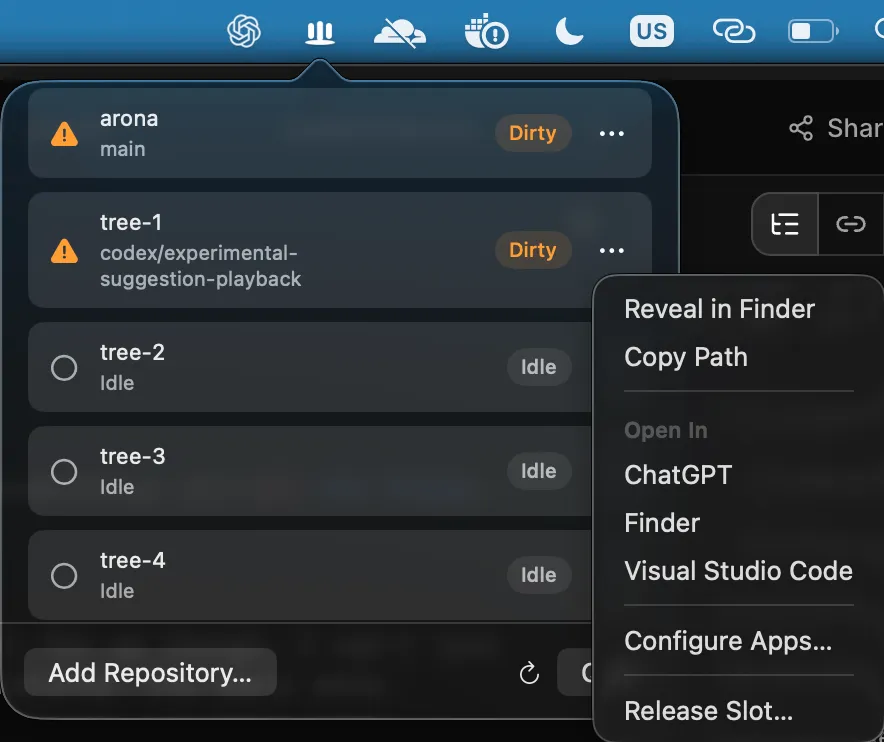
Treepool ships with an optional small menu-bar app on macOS. For me though, I can’t live without it. It has shortcuts to the many things worktrees-related. The small menu:
- Shows the repositories I have configured
- Shows the worktrees inside each repo, with their current status, and the branch they are holding
- Lets me release the worktree slot quickly when I’m done with it
- Has an “Open with
” select for each worktree. I use this feature the most, to quickly open my editor and review/refine the diff once the agent’s work is done.
The bottom line
In my daily work, if a new worktree takes ten minutes to prepare, I would have only created one for a task that feels important enough or none at all.
Now that it takes a few seconds to activate an idle slot, I tinker with much more at the same time: a feature or two at once, alongside a small accessibility fix, a dependency upgrade, a refactor on some piece of code I didn’t like, or a huge wild idea I might throw away.